

I see it constantly with my coaching students. Someone discovers agentic workflows, gets excited, and immediately tries to point an AI model at their business. Within a week, they're frustrated. The AI is producing inconsistent outputs, missing client context, and generally making a mess of things. They blame the tool. But the tool is not the problem.
The problem is that they handed a powerful system a disorganized operation and expected it to sort everything out. It does not work that way. AI does not fix chaos. It amplifies whatever it is given. If your foundation is shaky, adding AI to the mix compounds your problems instead of solving them.
I have been building agentic workflows into my own agency operations and teaching my coaching students to do the same. What I have learned through that process is that there are three foundational layers you need to have in place before you even think about automating a single task. Get these right first, and AI becomes genuinely transformative. Skip them, and you are going to waste a lot of time and money going in circles.
Layer One: Build a File and Folder Structure That Both Humans and AI Can Navigate
This sounds almost too basic to mention, but it is the thing I see most agencies get wrong. Your folder and file structure needs to be logical, consistent, and navigable, not just for your team, but for the AI agents that will eventually be working through it.
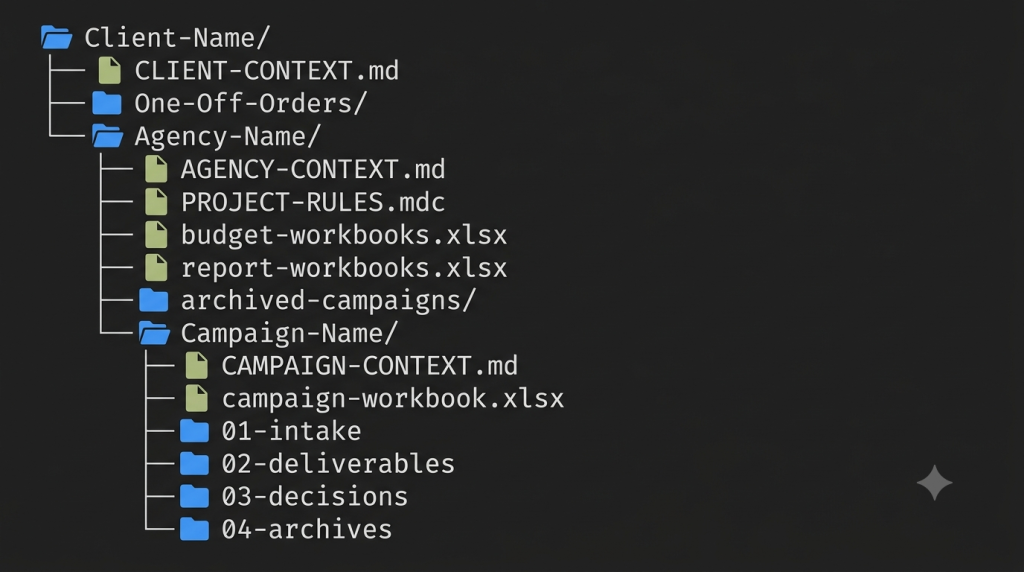
I use Cursor as my harness for building and running agentic workflows. Across my agency, I am managing over 200 monthly campaigns through that system. The only reason it works at any kind of scale is because the underlying folder architecture is clean and consistent. The AI can find what it needs without getting lost, and so can any human on my team.
The framework I have been implementing is called the Interpretable Context Methodology, developed by Jake Van Clief (Clief Notes Skool Community). The core idea is that you have to think of your agency as a system first, and then build your file structure to reflect that system. Every folder, every file, every naming convention should be purposeful. Nothing arbitrary.
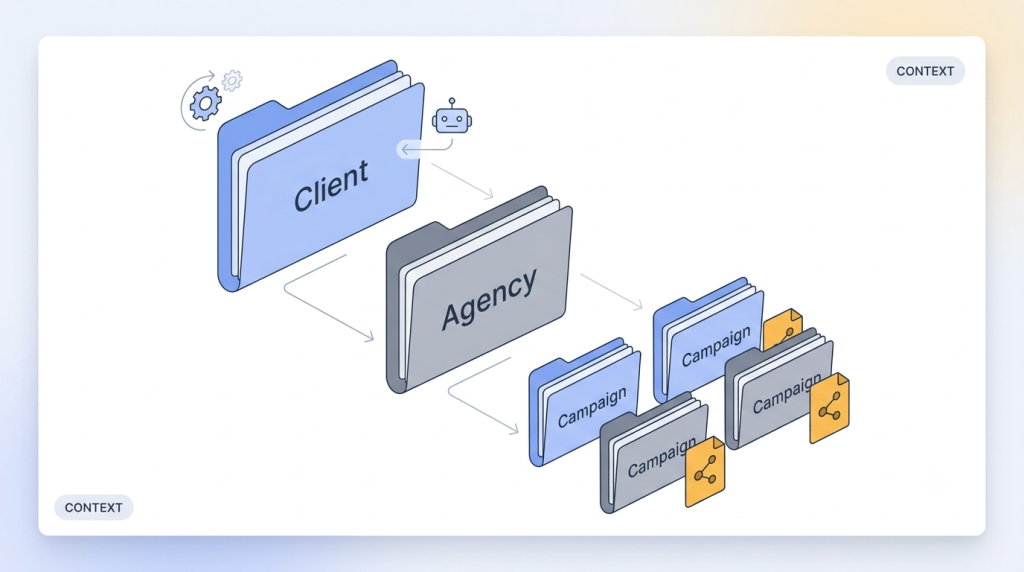
When you get this right, something important happens. The AI agent can move through your client data efficiently because the structure is predictable. There are no dead ends, no orphaned files, no folders that made sense six months ago but are a mystery now. It becomes a shared language between your human personnel and your AI agents, and that shared language is what makes collaboration between the two actually functional.
Layer Two: Build a Second Brain That Unifies Your Operational Knowledge and Client Data
The second foundational layer is the second brain system, and it serves two distinct but equally important purposes.
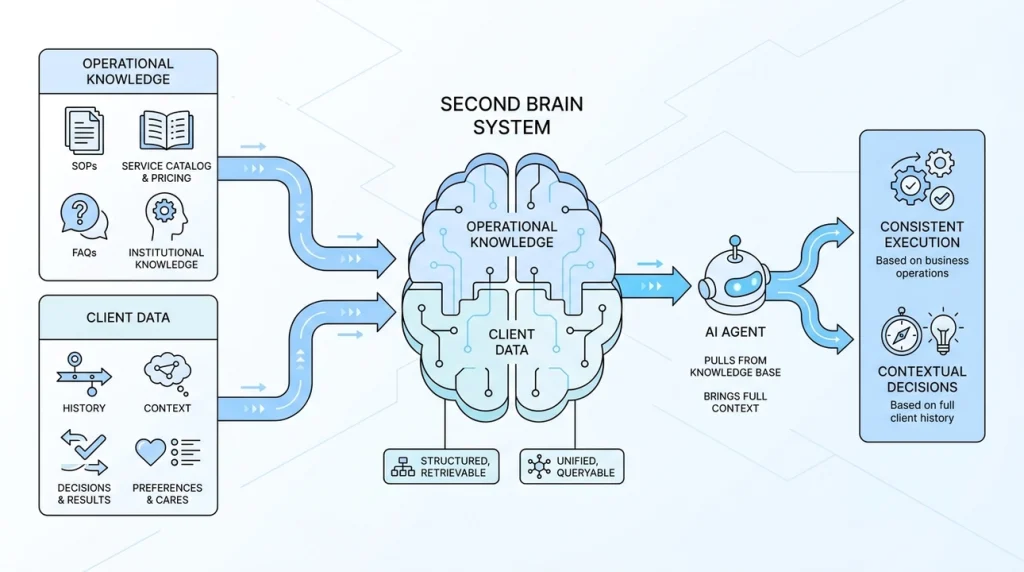
The first purpose is operational. Your second brain should house your SOPs, your service catalog, your pricing schedules, your FAQs, the institutional knowledge that lives in your head or in scattered documents across your team. Getting all of that into one structured, retrievable location is a prerequisite for working with AI effectively, because the AI needs to be able to pull from that knowledge base to make decisions and execute tasks in a way that is consistent with how your business actually operates.
The second purpose is as a unified customer database. This is the part that I think most agency owners underestimate. When an AI agent is working on a client campaign, it needs more than just the current state of that client. It needs the history. It needs the context that led to where things are today. What has been tried, what worked, what did not, what the client cares about, what decisions were made and why.
If that information is scattered across emails, Slack threads, random Google Docs, and individual team members' memories, the AI cannot retrieve it in any meaningful way. But if it is unified in a structured, queryable system tied to each client record, the AI can bring full context to every task it touches. That is the difference between an AI that feels useful and one that feels like it is constantly starting from zero.
Layer Three: Clean Up Your Processes Before You Hand Them Off
Once your structure and your knowledge base are in place, the next step is to look at your actual workflows. And here is where I want to be direct: do not try to automate a broken process. A bad workflow that a human executes imperfectly becomes a bad workflow that an AI executes at scale. That is not progress.
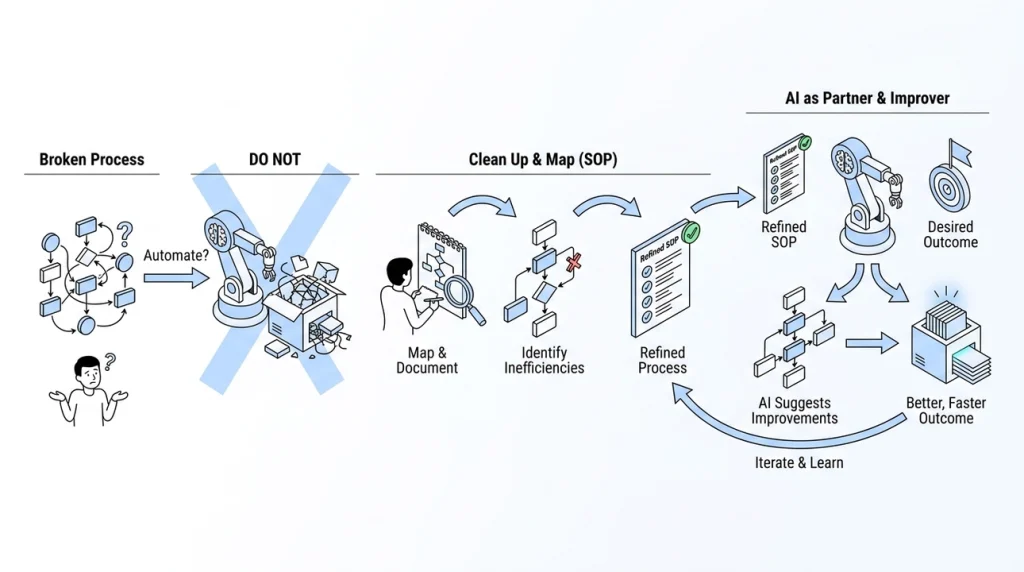
Before you assign any task to an AI agent, map it out in SOP format. Document how the work currently gets done, step by step. This exercise alone often surfaces inefficiencies you have been living with for years without realizing it. The act of writing a process down forces clarity that a vague mental model never demands.
But here is the part that surprised me when I first started doing this work, and it is the insight I find myself sharing most often now. When I started handing SOPs to AI models, I initially treated the process as sacred. Here is exactly how we do this, now automate it. What I found is that this is actually the wrong approach, or at least an incomplete one.
The models are capable enough now that if you give them the SOP and then also give them the desired outcome and the freedom to deviate from your documented process in the interest of efficiency, they will often improve on your SOP. They will find steps that can be combined, identify redundancies, or suggest a sequencing that gets to the same result faster. My workflows, as they exist today, are better than the SOPs I started with, because I trusted the model during the planning stage to treat the process as a starting point rather than a constraint.
This is a real mindset shift. Most people think of AI as an executor: give it a task, it does the task. What I have found is that it functions better as a process improvement partner, at least when you give it the room to play that role. The key is that your SOP needs to be producing a reliable, repeatable, desired outcome before you let the model iterate on it. You cannot hand it a broken process and ask it to make it better. You have to show up with something that already works, and then let the AI find ways to make it work even better.
The Real Cost of Skipping the Foundation
I want to come back to where I started, because I think it is worth being direct about this. The biggest mistake I see agency owners make is jumping into AI implementation 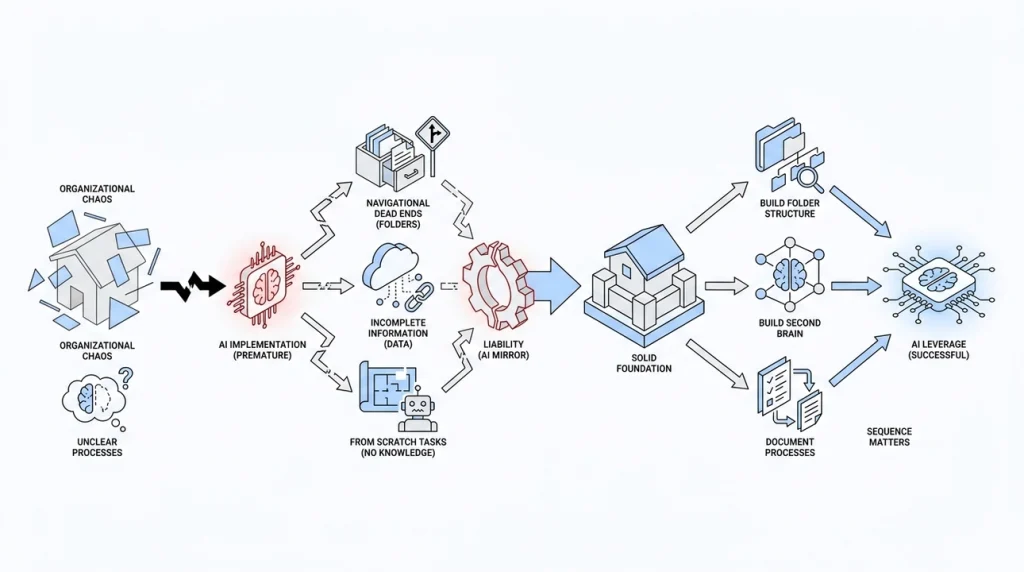 before they understand their own operations. They see the demos, they see the potential, and they want to get there immediately. I get it. The capabilities are genuinely exciting.
But what happens when you skip the foundation is that AI becomes a mirror for your disorganization. Unclear folder structures become navigational dead ends for your agents. Scattered client data means the AI is always working with incomplete information. Undocumented processes mean every task starts from scratch with no institutional knowledge to draw from.
The result is that AI stops feeling like leverage and starts feeling like a liability, and people conclude that it does not work for their agency. It does work. But it only works when it has something solid to build on.
Get your house in order first. Build the folder structure. Build the second brain. Document your processes. Then bring in the AI. That sequence matters more than any specific tool or model you choose, and it is the thing I wish someone had told me before I started.